CSS Tutorial
- CSS stands for Cascading Style Sheet.
- CSS is used to design HTML tags.
- CSS is a widely used language on the web.
- HTML, CSS and JavaScript are used for web designing. It helps the web designers to apply style on HTML tags.
What is CSS
CSS stands for Cascading Style Sheets. It is a style sheet language which is used to describe the look and formatting of a document written in markup language. It provides an additional feature to HTML. It is generally used with HTML to change the style of web pages and user interfaces. It can also be used with any kind of XML documents including plain XML, SVG and XUL.
CSS is used along with HTML and JavaScript in most websites to create user interfaces for web applications and user interfaces for many mobile applications.
What does CSS do
- You can add new looks to your old HTML documents.
- You can completely change the look of your website with only a few changes in CSS code.
Why use CSS
These are the three major benefits of CSS:
1) Solves a big problem
Before CSS, tags like font, color, background style, element alignments, border and size had to be repeated on every web page. This was a very long process. For example: If you are developing a large website where fonts and color information are added on every single page, it will be become a long and expensive process. CSS was created to solve this problem. It was a W3C recommendation.
2) Saves a lot of time
CSS style definitions are saved in external CSS files so it is possible to change the entire website by changing just one file.
3) Provide more attributes
CSS provides more detailed attributes than plain HTML to define the look and feel of the website.
How to add CSS
CSS is added to HTML pages to format the document according to information in the style sheet. There are three ways to insert CSS in HTML documents.
- Inline CSS
- Internal CSS
- External CSS
1) Inline CSS
We can apply CSS in a single element by inline CSS technique.
The inline CSS is also a method to insert style sheets in HTML document. This method mitigates some advantages of style sheets so it is advised to use this method sparingly.
If you want to use inline CSS, you should use the style attribute to the relevant tag.
Syntax:
<htmltag style="cssproperty1:value; cssproperty2:value;"> </htmltag>
Example:
- <h2 style="color:red;margin-left:40px;">Inline CSS is applied on this heading.</h2>
- <p>This paragraph is not affected.</p>
2) Internal CSS
The internal style sheet is used to add a unique style for a single document. It is defined in <head> section of the HTML page inside the <style> tag.
Example:
- <!DOCTYPE html>
- <html>
- <head>
- <style>
- body {
- background-color: linen;
- }
- h1 {
- color: red;
- margin-left: 80px;
- }
- </style>
- </head>
- <body>
- <h1>The internal style sheet is applied on this heading.</h1>
- <p>This paragraph will not be affected.</p>
- </body>
- </html>
3) External CSS
The external style sheet is generally used when you want to make changes on multiple pages. It is ideal for this condition because it facilitates you to change the look of the entire web site by changing just one file.
It uses the <link> tag on every pages and the <link> tag should be put inside the head section.
Example:
- <head>
- <link rel="stylesheet" type="text/css" href="mystyle.css">
- </head>
Let's take an example of a style sheet file named "mystyle.css".
File: mystyle.css
- body {
- background-color: lightblue;
- }
- h1 {
- color: navy;
- margin-left: 20px;
- }
CSS Syntax
A CSS rule set contains a selector and a declaration block.
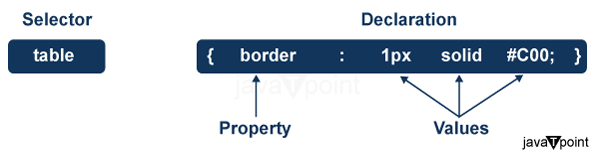
Selector: Selector indicates the HTML element you want to style. It could be any tag like <h1>, <title> etc.
Declaration Block: The declaration block can contain one or more declarations separated by a semicolon. For the above example, there are two declarations:
- color: yellow;
- font-size: 11 px;
Each declaration contains a property name and value, separated by a colon.
Property: A Property is a type of attribute of HTML element. It could be color, border etc.
Value: Values are assigned to CSS properties. In the above example, value "yellow" is assigned to color property.
Selector{Property1: value1; Property2: value2; ..........;}


Comments
Post a Comment